


Five Guys Burgers & Fries
4.34.54K Reviews
App Specs
- Version
- 5.22.0
- Updated On
- License
- Free
- Downloads
- 1,000,000+
- Developer
- Five Guys Franchisor LLC
- Categories
- Shopping
- Platform
- Android, iOS
Screenshots
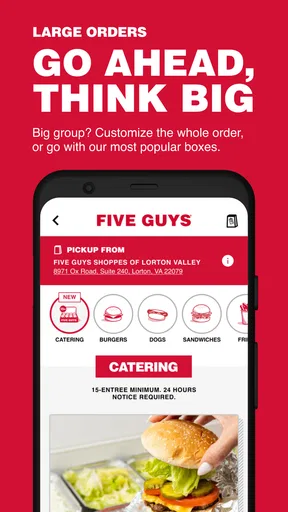
 Analysis by AppCompare
Ordering a Five Guys meal from a phone sounds simple, but the useful part of Five Guys Burgers & Fries is not merely that it accepts orders. The app puts the restaurant’s ordering process in one place, so I can choose a location, build a burger or fries order, and send it ahead instead of starting from scratch at the counter. That makes it most valuable when I already know what I want and would rather spend less time dealing with the ordering queue.
I reviewed it as a shopping app rather than as a general food-discovery tool. That distinction matters. This is not the kind of app I open to compare several restaurants, search broadly for nearby meals, or plan an entire grocery shop. It is focused on Five Guys, and that narrow focus is also its main strength. When I want food from this particular chain, the path from opening the app to placing an order feels more direct than using a general delivery marketplace.
The app is free, carries an Everyone age rating, and comes from Five Guys Franchisor LLC. It has been available since March 3, 2011, and its current version is 5.22.0 for devices running Android 7.0 or later. Its Android store summary says it is taking orders from the phone, which is exactly the capability I found most important in everyday use.
Ordering ahead is the feature that changes the experience
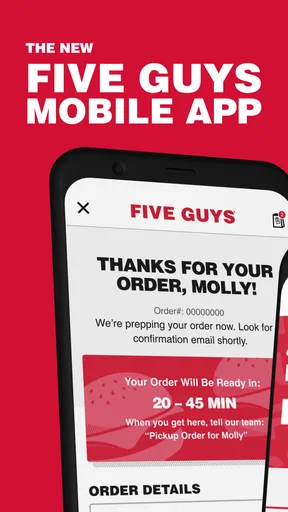
The central capability is mobile ordering for Five Guys. Instead of waiting until I reach the restaurant to decide on the meal, I can prepare the order in advance and use the phone as the starting point for the purchase. That is a small change in theory, but it affects the whole visit: I can think through toppings, select the items I actually want, and avoid holding up the line while making choices.
For a restaurant with a menu built around customizable burgers, hot dogs, sandwiches, fries, and shakes, advance ordering is particularly practical. The app gives me a calmer setting for making selections than a busy counter. I can pause to check what I have chosen before submitting the order, which is useful when my order includes several modifications or when I am ordering for more than one person.
The real benefit is decision control before arrival, not simply speed after arrival. The app does not make every part of a restaurant visit instant. Food still has to be prepared, and I still need to collect it or follow the available ordering flow. What it does is move the fiddly part of choosing the meal away from the busiest moment.
This makes the app different from a typical delivery marketplace. A marketplace is useful when I want to compare restaurants, browse offers, or have food brought from several possible places. Five Guys Burgers & Fries is more focused: it is the better fit when the restaurant is already my decision and I want a direct way to order from it. I would not install it just to explore local dining options, but I would use it when I repeatedly choose Five Guys.
Worth Reading Before You Choose

EA SPORTS FC Mobile 26 Is a Bigger Football Game, but It Takes Time

Flipboard Shows What News Apps Must Do Beyond the Feed

Switching to Android Auto Means Rethinking Your Driving Routine

Google Calendar Makes a Crowded Week Easier to Manage

Ludo King Makes the Most of the Minutes Between Plans

Baby Panda World Brings Quick Play to Modern Phones, but Its Game Library Feels Busy
What the ordering flow feels like
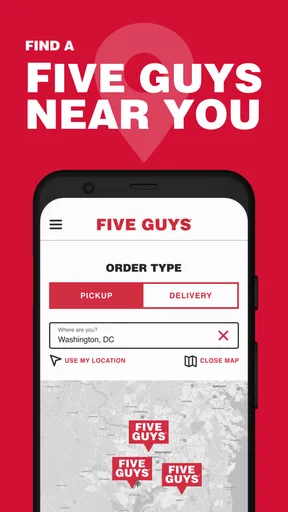
In practice, I start by identifying the Five Guys location I intend to use. That step deserves more attention than it might seem. If I am ordering during a commute, meeting friends, or picking up food near work rather than home, choosing the correct location first helps prevent the most frustrating kind of mistake: preparing an order for the wrong restaurant.
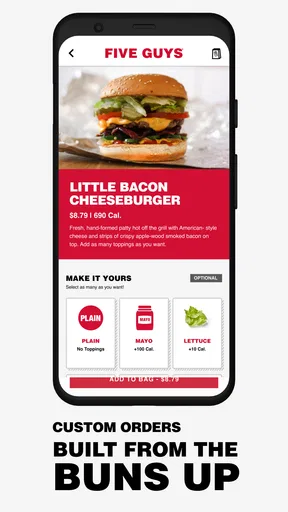
After that, I work through the menu and customize the meal. The phone interface is most helpful when I treat it as an order checklist rather than rushing through it. I select the main item, review the available choices, add fries or a drink if needed, and then check the finished order before proceeding. For a single meal, this is straightforward. For a group order, I find it more useful to complete one person’s choices at a time and review the basket after each addition.
That workflow also exposes one of the app’s practical limitations. A dedicated restaurant app can be more focused than a marketplace, but it cannot remove the need to pay attention. Customization creates opportunities for accidental omissions, especially when several people want similar meals with different toppings. My advice is to use the review stage deliberately instead of treating the final screen as a formality.
The app is best when I already know the restaurant’s style and have a reasonably clear idea of my order. Someone trying Five Guys for the first time may still need to spend time understanding the menu and deciding how much food to order. The app can organize that decision, but it cannot replace personal judgment about appetite, group size, or preferences.
A realistic lunch scenario
Imagine I am leaving work for a short lunch break and want to pick up a burger and fries. If I wait until I arrive, I have to stand at the counter, decide on the meal, work through the toppings, and then wait for the order to be handled. With the app, I can make those choices before leaving my desk. I select the intended restaurant, build the meal, inspect the order, and place it before walking over.
The important advantage is not a guaranteed preparation time; it is that the lunch break is less vulnerable to indecision. If I am ordering for two coworkers as well, the value becomes clearer. I can assemble the group’s choices in one sitting, check them together, and avoid trying to remember three separate topping combinations while standing in front of the cashier.
There is a useful trade-off here. Ordering ahead can save attention at the restaurant, but it requires planning. If my destination changes unexpectedly, an order created for the original location may no longer suit the situation. I therefore use the app for predictable trips and use the counter when plans are uncertain or when I want to decide only after seeing how hungry I am.
Where the app helps more than a normal counter order
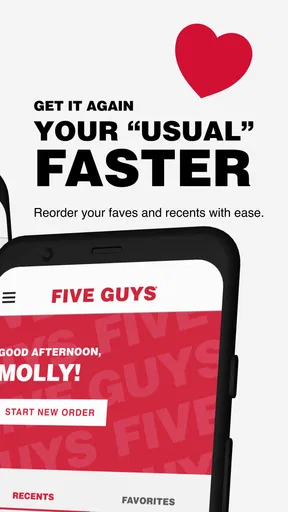
The strongest use case is repeat ordering. If I already have a familiar Five Guys meal, the app turns a known decision into a repeatable routine. I can use the phone to avoid explaining the same choices aloud and to reduce the chance that I forget an item when ordering for a family or small group.
It is also useful for people who prefer visual confirmation. I like being able to see the developing order rather than relying entirely on memory. That is especially helpful for a meal with several custom selections. The screen becomes a record of what I intended to request, and reviewing it before submission gives me one last opportunity to catch a wrong item or missing addition.
Another less obvious advantage is that the app separates menu browsing from social pressure. At a crowded counter, I can feel pushed to decide quickly even when the menu has several combinations to consider. On the phone, I can take a moment to think. That does not make the food better, but it can make the ordering experience less stressful for cautious or indecisive customers.
For accessibility and comfort, the value depends on the person. Some customers may find a visual menu easier than speaking a detailed order. Others may prefer human help, especially if they have questions about ingredients or need assistance with an unusual request. I would not treat the app as a replacement for staff interaction in situations where clarification is important.
The trade-offs I noticed
The narrow focus is the first trade-off. Because the app is built around one restaurant brand, it is not useful for comparing nearby alternatives. If my priority is the lowest cost, the shortest overall trip, or a wider selection of cuisines, a general map or delivery app may be more useful. This app makes sense when Five Guys is already part of the plan.
The second trade-off is that mobile ordering adds a step before the meal. I need to open the app, choose the location, build the order, and verify it. For a quick, uncomplicated purchase at an empty counter, speaking to a cashier may actually be faster. I see the app as a tool for reducing friction in the right circumstances, not as a rule that every order should begin on a phone.
There is also the risk of overconfidence. Seeing an order on a screen can make the process feel finished, but I still need to pay attention to the selected location and the final contents. My practical habit is to read the basket from top to bottom before submitting, particularly when ordering for other people. That small check is more valuable than trying to rush through the interface.
Another limitation is that the app’s usefulness depends on my phone and connection working when I need it. A counter order is less dependent on remembering a login flow or having the device ready. For that reason, I keep the app as a convenience rather than my only way to buy a meal. If I am in a hurry and the phone experience becomes awkward, I would simply order in person.
I also would not choose it solely because it is free. The absence of an app price makes installation easy, but the meal itself is still a separate purchase. The app is worthwhile when it saves time, reduces ordering mistakes, or makes customization easier for me. If none of those benefits matters in a particular visit, installing or opening it adds little.
Who gets the most value
Regular Five Guys customers gain the most. The more familiar I am with the menu and my preferred order, the more the app feels like a practical shortcut. It is also a good fit for families, roommates, and small groups because one person can organize several choices before arriving. The ability to review the whole order on a phone is more convenient than trying to coordinate everyone at the counter.
Busy workers and commuters are another strong audience. The app lets them make the ordering decision during a quiet moment and use the restaurant visit mainly for collection. That can be helpful when the available break is short, although I would still leave enough flexibility for the normal preparation and pickup process rather than assuming the meal will be waiting immediately.
People who dislike ordering aloud may appreciate the visual workflow. The same is true for anyone who wants to double-check customizations before committing. In my experience, the app’s value grows with the number of decisions in the order, not necessarily with the price or size of the meal.
On the other hand, I would skip it if I rarely eat at Five Guys, prefer comparing multiple restaurants, or usually decide what to eat spontaneously. It is also not my first choice when I need detailed personal assistance about the menu. In those cases, a general food app or direct conversation at the restaurant may serve me better.
How the app stands among shopping alternatives
Compared with ordering at the counter, the app offers more privacy and more time to review choices, while the counter offers immediate human guidance and fewer phone-related steps. Compared with a broad delivery service, it is more specialized and potentially less distracting, but it does not serve the wider browsing purpose of a marketplace. The right choice depends on whether I value focus or variety.
Its adoption also suggests that the format works for many customers: the Android listing shows an average rating of 4.3 from around twelve thousand ratings, with over one million installs. Those figures do not make the app perfect, but they indicate that mobile ordering is a well-established part of how people use the brand.
I found the app easiest to recommend when the order is planned, customized, and tied to a known location. I found it harder to recommend as a discovery tool or as a universal replacement for the restaurant counter. That distinction keeps expectations realistic and makes the decision to use it much simpler.
My recommendation after using it
Five Guys Burgers & Fries is a focused ordering companion for people who already want Five Guys. Its strongest contribution is moving menu decisions onto the phone before the restaurant visit. That can make repeat meals, group orders, and short lunch breaks easier to manage, especially when I take a moment to confirm the location and review every item before submitting.
I would recommend downloading it if Five Guys is a regular choice and I want a more organized way to place customized orders. I would be less enthusiastic for occasional visitors who want restaurant comparisons, broad delivery choices, or detailed help from a person. The app does not need to do everything to be useful; it simply needs to make this one restaurant’s ordering process more comfortable.
With a 4.5-star review average shown across roughly four and a half thousand written reviews, the app has attracted plenty of detailed user feedback, and its long availability supports the idea that it is not a temporary experiment. My final view is practical rather than absolute: use it when advance planning solves a real problem, and keep the counter or a broader food service in mind when flexibility matters more than a streamlined Five Guys order.
Pros
- Simple menu makes ordering quick and easy.
- Generous portions are satisfying for bigger appetites.
- Many free topping combinations allow plenty of customization.
- Freshly prepared fries offer a choice of regular or Cajun seasoning.
- The app can make repeat orders faster and more convenient.
Cons
- Prices are higher than many other fast-food burger chains.
- Large portions may feel excessive for lighter eaters.
- Fries can become soggy if delivery takes too long.
- Limited healthier options may not suit every diet.
- Busy locations can have long waits during peak hours.
FAQs for Five Guys Burgers & Fries
What can I do with the Five Guys Burgers & Fries app?
The Five Guys Burgers & Fries app is designed to make ordering from participating restaurants more convenient. After selecting a location, you can browse the menu, customize burgers, hot dogs, sandwiches, fries, and drinks, then place an order for pickup. Availability may vary by restaurant, so check the selected location carefully before confirming your order.
Can I customize my burger or meal in the Five Guys app?
Yes. One of the app’s most useful features is the ability to personalize your order. You can choose toppings and adjust items according to your preferences, although the exact options can depend on the menu and restaurant selected. Review every customization before checkout, especially if you have allergies or specific dietary requirements.
Does the Five Guys app offer delivery or only pickup?
Ordering options depend on your location and the services supported by the selected Five Guys restaurant. In many cases, the app focuses on ordering ahead for pickup, while delivery may be provided through an external delivery partner or may not be available at all. Enter your address or choose a restaurant to see the options offered in your area.
How much does ordering through the Five Guys app cost?
The prices shown in the app generally reflect the menu prices for the restaurant you select, but your final total can include taxes, service charges, delivery fees, or other applicable costs. Pickup orders usually avoid delivery-related fees. Before placing the order, carefully review the complete breakdown so there are no surprises at checkout.
Is the Five Guys Burgers & Fries app available for both Android and iPhone?
The Five Guys Burgers & Fries app may be available for Android and iOS, depending on your country and the current app-store listing. Availability, supported features, and restaurant coverage can differ by region. Download it only from the official Google Play Store or Apple App Store, and make sure the developer name matches the official Five Guys brand.


